We are currently investigating an issue with BrightPay and have temporarily restricted some levels of access

Every tax year we release brand new software in line with the new budgetary requirements.
Thus, to move your payroll on to a new tax year, when you are logged into BrightPay, simply select the tax year version of BrightPay in the top left hand corner.
The option to select the 2026 tax year will be available on the dropdown menu. Select this option to bring you forward to the 2026 tax year.
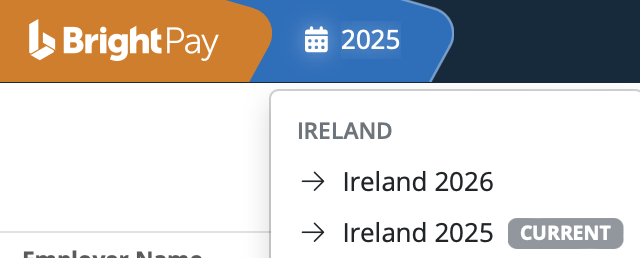
Your software for the new tax year will contain a seamless import facility to bring across your employee details from the previous tax year. In doing so, your previous year’s information will remain untouched and accessible.
Please note:
BrightPay (cloud) has two billing options for customers:
Monthly subscription: Monthly payments are due and payable monthly in arrears by Direct Debit on the 2nd of the following month or the next working day, based on your total number of active employers and employees in that month. Payments are taken automatically each month.
Annual payment: Annual payment plans are paid in advance and payable on the 4th of the following month based on the number of employers and employees you will need in that year. A discount will apply to annual payments. *
*Additional usage that is higher than the annual payment plan will be charged based on monthly subscription prices with overage payments taken automatically each month.
Need help? Support is available at 01 8352074 or [email protected].







Copyright © 2026 Thesaurus Software Ltd T/A Bright Software Group.
Unit 35 Duleek Business Park, Duleek, County Meath, A92 N15E, Ireland
[email protected] 01 8352074