We are currently investigating an issue with BrightPay and have temporarily restricted some levels of access

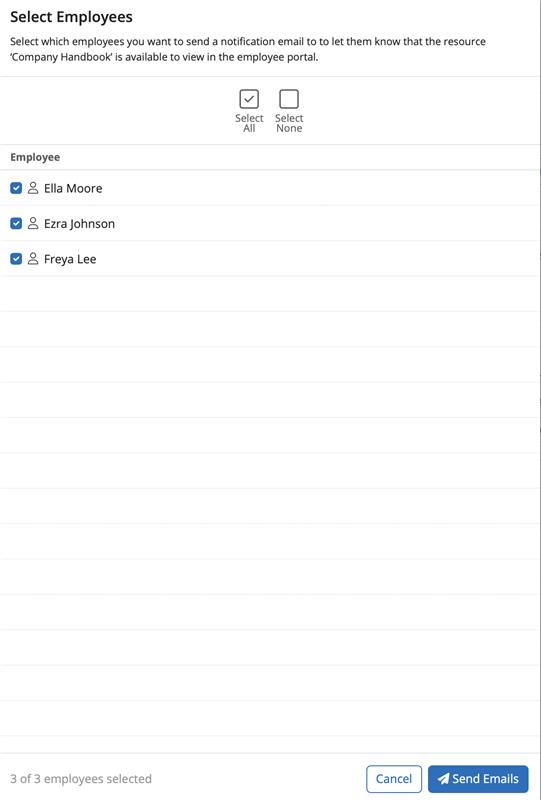
Email notifications can be sent to employees to advise that a resource is available to view on their Employee Self Service Portal. Select 'Send Notification Emails' when you select the resource.

Employees that have permission to view the resource and that have an email address in their profile will be available to select for a notification email to be sent. Select 'Send Emails' for the notifications to be sent.
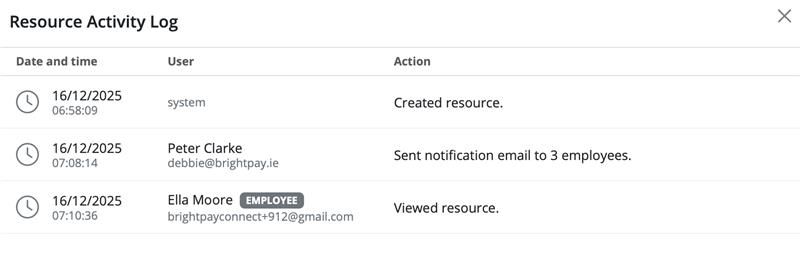
The Activity Log will show when the resource was created, if email notifications were sent to employees and when and if an employee viewed the resource and when.

All actions by users or employees will be listed on the Activity Log in date order.
Need help? Support is available at 01 8352074 or [email protected].







Copyright © 2026 Thesaurus Software Ltd T/A Bright Software Group.
Unit 35 Duleek Business Park, Duleek, County Meath, A92 N15E, Ireland
[email protected] 01 8352074