Black Friday
 

Employees - Overview

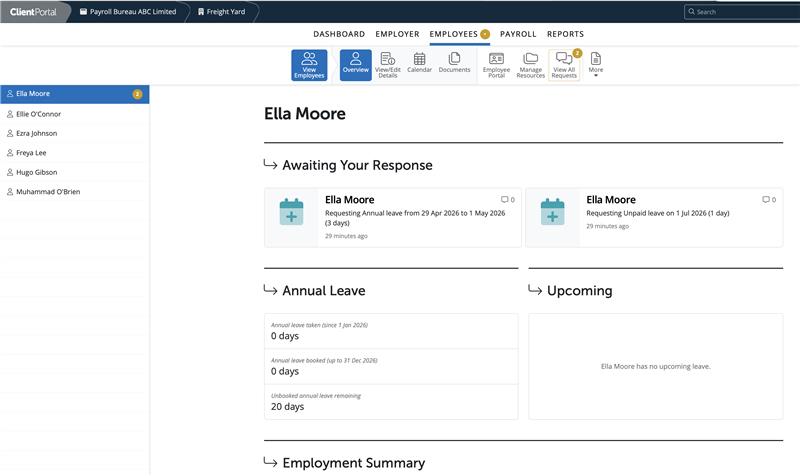
Within the Employees section please click on an employee to navigate to their employee dashboard.

Your view of an employee's dashboard views any outstanding employee leave or change of personal details requests, their annual leave entitlement and any upcoming leave for the employee.

A user can view an employee's personal, employment and HR details, view the employee calendar and enter in leave, view payroll documents such as payslips.

Employee Portal Settings can be accessed, Resources can be added or managed and all employee requests can be viewed by a user.
 

Need help? Support is available at 01 8352074 or [email protected].

BrightPay (Cloud) System Requirements2026 BrightPay - AvailabilityWhat's New in BrightPay?Two Factor Authentication - OrganisationWhat's happening to BrightPay for Windows?Introduction to BrightPayGetting StartedStarting the New Tax YearImporting Into BrightPay from BrightPay WindowsMoving to BrightPay from another payroll softwareUser ManagementMultiUser EnhancementsEmployer DetailsEmployee DetailsDigital CertificatesRevenue Payroll Notifications (RPNs)Processing PayrollPayroll Submission Requests (PSRs)Importing Pay Data using CSV FileDistributing PayslipsPaying EmployeesMaking Corrections in PayrollPayroll Calendar 2025Payroll Calendar 2026Benefit in KindEmployee Self Service PortalBrightPay (Cloud) Service InfrastructurePayroll JournalsAnalysisPayroll DeductionsNational Minimum Living WagePensionsSwitching an Employee's Pay FrequencyYear EndEnhanced Reporting Requirements (ERR)BrightExpensesPayslip Translations2025 Budget - Employer Focus2026 Budget - Employer FocusAnnual LeaveEmployment Law - InformationSEPA format - Banks catered for in BrightPayTwo Factor Authentication - EmployeesAuto EnrolmentClient PortalResourcesRelease NotesImporting Information From Connect into BrightPay cloudAuto Enrolment in BrightPay







