We are currently investigating an issue with BrightPay and have temporarily restricted some levels of access

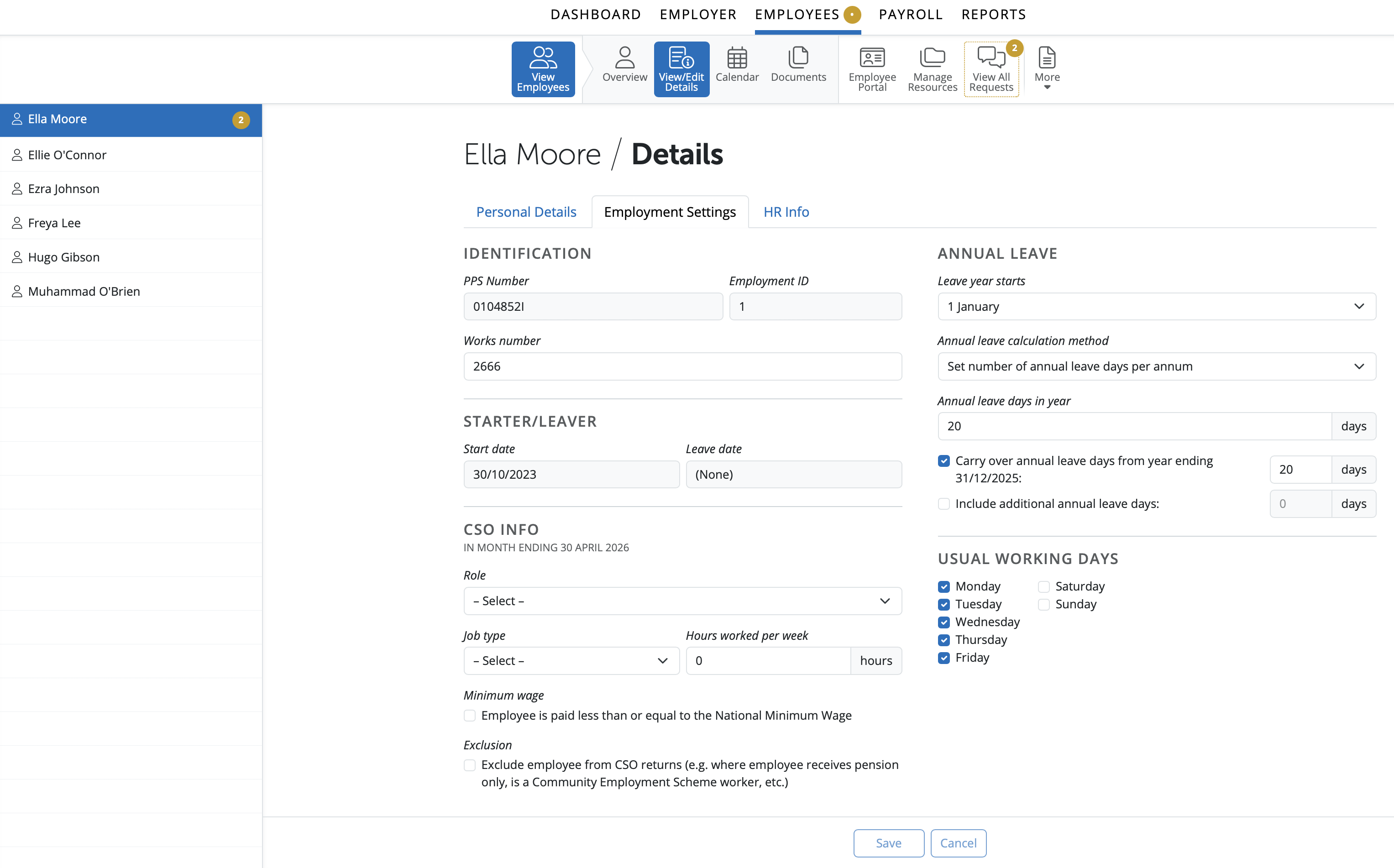
In the Employee section of the Client Portal a user can access basic Employee information. To access Employment details for an employee go to > Employees > Select Employee from listing > Employment.
This information can be edited and saved once the user has permission to do so. Details entered or any changes saved by a user will be updated in the Client Portal and in the employer in BrightPay.
View/Edit the employee's works number.
Enter the date on which the employee’s annual leave year starts.
Select the method of annual leave calculation applicable to the employee from the drop down menu.
Enter the employee's annual leave entitlement, as required.
Enter the amount of annual leave carried over, if applicable.
Tick to include additional accrued annual leave and enter the adjustment amount in the field provided.
Should the employee’s typical working days differ to the default days already ticked, simply amend where necessary.
The CSO section facilitates the compilation of CSO (Central Statistics Office) statistics for the EHECS (Earnings, hours & employment costs survey).
If selected to complete these surveys, you are obliged by law to fully complete and return these forms to the Central Statistics Office. Further information can be found at www.cso.ie .
Please note: the CSO section must be completed for all employees in order for the software to be able to compile the CSO statistics required.
Complete the CSO section as follows:
Role
Using the drop down menu, select the role that applies to the employee:
Manager/Professional
Examples: Legislators and senior officials, corporate managers, managers of small enterprises
Clerical/Sales/Service
Examples: Clerks, office workers, service & sales workers
Other
Examples: Plant & machine operators & assemblers, skilled craft & trade workers and other manual occupations
Job Type
Select whether the employee works full-time, part-time, a trainee/ apprentice or 'other'.
Hours Worked Per Week
If the employee is not paid by the hour, enter the number of hours the employee normally works per week.
Wages
Tick the box if the employee is paid less than or equal to the National Minimum Wage.
Exclusion
If the employee is to be excluded from the CSO return (e.g. if the employee receives a pension only, is a Community Employment Scheme worker, etc.) tick the box provided.
Need help? Support is available at 01 8352074 or [email protected].







Copyright © 2026 Thesaurus Software Ltd T/A Bright Software Group.
Unit 35 Duleek Business Park, Duleek, County Meath, A92 N15E, Ireland
[email protected] 01 8352074