
Black Friday
 

Backing Up to BrightPay Connect

With BrightPay Connect, you don't need to worry about manually backing up your payroll data. When you connect an employer to BrightPay Connect, it will automatically be synchronised online as you run your payroll or make any changes.

While signed in to BrightPay Connect, payroll data is automatically backed up every 15 minutes when the employer file is open in the BrightPay software and again when you close out of the employer file. A historical and chronological set of backups is maintained so that a backup can be restored from the cloud at any time.

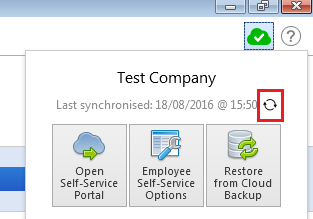
You can also manually synchronise your BrightPay data to BrightPay Connect at any time by clicking the green cloud icon and pressing the synchronise icon:


Need help? Support is available at 01 8352074 or [email protected].

2026 BrightPay - System RequirementsBright ID2026 Budget - Employer Summary2026 BrightPay - AvailabilityIntroduction to BrightPayStarting the New Tax YearImporting from the Previous Tax YearInstalling BrightPayMoving from Thesaurus Payroll Manager to BrightPayMoving to BrightPay from another payroll softwareMoving BrightPay to a new PCBureau Enhancements - Additional FunctionalityEmployer SetupDigital CertificatesEmployee SetupRevenue Payroll Notifications (RPNs)Payroll CalendarProcessing PayrollImporting Pay Data from a CSV FilePayroll DeductionsPayroll Submission Requests (PSRs)Distributing PayslipsPaying EmployeesSEPA format - Banks catered for in BrightPayMaking Corrections to PayrollRevenue PaymentsRevenue - Contact Telephone NumbersAnalysisPayroll JournalsProcessing StartersProcessing LeaversBenefit in KindIllness BenefitParenting BenefitsPensionsSwitching an Employee's Pay FrequencyBacking Up & Restoring Data FilesYear EndLeave Reporting & Employee CalendarAnnual LeaveLeave EntitlementsEmployment LawCSOGlossary of Terms (Pre 2019) - Foreign Language Help SheetsBrightPay Connect
BrightPay Connect - OverviewRegistering for BrightPay ConnectConnecting an Employer to BrightPay ConnectCustomising your BrightPay Connect AccountAssigning a New User in BrightPay ConnectEditing/Deleting a User from BrightPay ConnectEnabling Employee Access to Self ServiceConfiguring Employee Self Service OptionsDisabling/Editing Employee Access to Self ServiceInviting Employees to use Self ServiceBacking Up to BrightPay ConnectRestoring from a BrightPay Connect BackupUploading Previous Year Data to BrightPay ConnectDeleting a Company in BrightPay ConnectTwo Factor AuthenticationEmployer Self Service PortalEmployee Self Service PortalConnect for BureausConnect MultiUser EnhancementsBrightPay Connect - Terms of Service
GDPRBright Terms and Conditions and BrightPay End User Licence AgreementEnhanced Reporting Requirements (ERR)BrightExpensesTPM v BP - Employee recordsTPM v BP - Running the payrollBP v TPMIssue Activating your Licence KeyAuto-Enrolment – Employer Help GuideAuto-Enrolment – Employer Help Guide






